Reading a Power Quality Analyzer Datasheet: Harmonics, Flicker and Recording
A power quality analyzer datasheet is written to sell, and the headline figures are chosen for that purpose. Reading it well means looking past the headlines to the conditions behind them: which standard, which probe, which interval, and which figure applies to the model you will actually receive.
Start with the measurement standard. A datasheet that cites IEC 61000-4-30 class A describes a measurement method with defined aggregation, accuracy and flagging rules; class B describes a different, less strict method. The GF438II shop listing cites IEC 61000-4-30 method and Class A level, while the GF4385 category page cites IEC 61000-4-30 class B 0.5%. Those are different methods, and results from one cannot be compared directly with results from the other. Check which class your contract or standard requires before comparing models, and confirm the class in writing for the model offered.
Next, harmonics. A datasheet gives a harmonic range, such as 2nd to 50th or 2nd to 64th, and that range decides which harmonics are seen at all. The GF4385 lists 2nd to 50th harmonics; the GF335 and GF334 list 2nd to 64th. A harmonic above the measured range is not measured as zero; it is not measured at all. If the loads on site generate high-order harmonics, a 50th-harmonic limit may miss the very distortion being investigated. Check the range against the loads, not against the headline.
Then flicker. Flicker measurement follows IEC 61000-4-15, and it is a statistical measure over time, not a single reading. A datasheet that lists flicker measurement without stating the observation period or the statistic used has not told you enough to compare it with another analyzer. Ask what flicker statistic is reported and over what period, and whether short-term and long-term flicker are both reported.
Recording comes next, and it is where headline figures mislead most. A recording time such as 728 hours, a storage figure such as 32GB, and a parameter count such as 1000 parameters sound generous together, but they interact: recording more parameters at a shorter interval fills storage faster, and a long recording at a coarse interval misses short events. The GF438II shop listing describes a 3-second interval with 728 hours and up to 32GB; the E6000 lists a 3-second interval with 120 hours and 8GB. Ask for the recording time at the interval and parameter count you will actually use, not the maximum of each figure separately.
Accuracy deserves its own caution, and it is the most important one in this post. Accuracy figures in a datasheet or listing apply under stated conditions, and for current measurement they depend on the probe. The reference material behind this site gives different accuracy figures for the same analyzer model in different parts of one shop listing, and the manufacturer's category page gives no accuracy figure for that model at all. This site therefore states no single accuracy figure for that model, and says instead that its voltage and current accuracy is clamp-dependent. A buyer should do the same: ask for the accuracy that applies to the clamps and ranges you will use, in writing, from the current datasheet, and treat any single accuracy figure quoted without its conditions as incomplete.
Channels, probes and safety ratings follow the same rule. Channel count should be checked as voltage channels plus current channels, not as a total that hides the split. Probe ranges should be checked against the circuits to be measured, including the largest fault current, not only the normal load. Safety ratings such as CAT III 1000V and CAT IV 600V apply to the measurement category and voltage of the circuit, not to the analyzer in general; using an analyzer outside its rated category is a safety error, not a measurement error.
Finally, the datasheet itself. Datasheets are marked subject to change without notice, and a figure from an old edition may not apply to the unit supplied. Ask for the current datasheet for the exact model and version offered, confirm the figures that matter to your application in writing, and keep that confirmation with the order. Before payment, confirm the model, the measurement class, the harmonic range, the probe range, the accuracy conditions, the quantity, and the delivery terms. A datasheet read this way takes longer than reading the headlines, and reading it this way helps judge whether an analyzer suits the application; whether results meet requirements still depends on the actual configuration, calibration, test method, and acceptance criteria.
Event capture is the last datasheet section to read carefully, because it decides whether short disturbances are seen at all. Dips, swells and interruptions last milliseconds to seconds, and an analyzer that averages over too long an interval will smooth them away. Check the shortest event the analyzer records, the trigger settings available, and whether waveform capture is provided for the event, so that the cause can be identified afterwards rather than guessed from averaged values. A recording that shows only that voltage dipped, without the waveform, cannot distinguish a fault on the supply from a load switching on site, and the two causes have different remedies. Ask for the event capture specification — trigger, pre-trigger recording, waveform length, and the number of events stored — and compare it with the disturbances the site actually experiences. A site with motor starting problems needs different event capture from a site with lightning-related interruptions, and the datasheet section that describes event capture is where that difference shows.
Software is the last datasheet section worth a careful read. An analyzer is only as useful as its reporting: how data is downloaded, how reports are generated, whether reports can be customized, and what file formats are provided. A datasheet that lists software by name without describing its reporting has not told you whether the reports it produces will satisfy the person who must act on them. Ask for a sample report for the model offered, and check it against the reporting format your contract or investigation requires, before ordering.
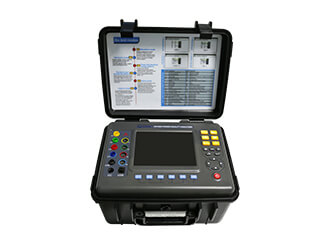
Figures on this page come from the manufacturer's own category pages, manufacturer-hosted datasheets, or a shop listing stated as such. Where the reference material does not settle a figure, this site states that it is unresolved and publishes no figure, rather than choosing one.
What to confirm before ordering
Before payment, confirm the model, the specification from the current datasheet, the quantity, the price, the lead time, and the delivery terms, in writing. Ask in your inquiry to confirm the payment terms, the trade terms, and the reply time you should expect, rather than assuming any of them. No price, minimum order or lead time figure is stated on this site.
Send an inquiry: include the model, the test or measurement requirement, and the quantity you need. Before payment, confirm the model, the specification from the current datasheet, the quantity, and the delivery terms.